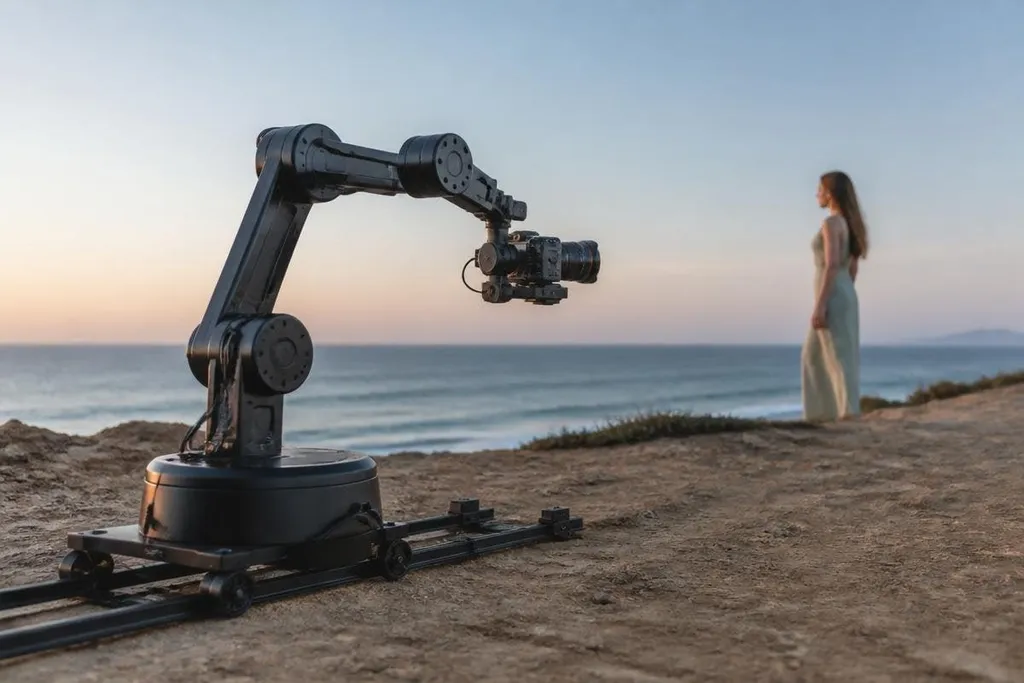
Photography robots now do more than hold a camera in one place. They can move through a shot, keep a subject in frame, repeat the same camera path, and adjust their settings as the scene changes. The reason is a tighter mix of cameras, motors, sensors, and software.
Quick read
- Motorized camera movement can repeat the same shot with close accuracy.
- Depth sensors help a robot judge distance from people and objects.
- The hard limits are lighting, safety, setup time, and the quality of the final image.
The camera is only one part
Photography robots need to control position as well as image settings. A 3-axis gimbal moves the camera around pan, tilt, and roll axes, helping keep the lens level as the robot turns or travels.
The camera may also use shutter speed, aperture, and ISO controls. Those settings decide how much light reaches the sensor and how motion appears in the image. A system that can change them during a shoot has more options than a fixed camera rig.
That control matters when a shot needs to repeat. A human operator can try to match a camera move, but small changes in speed, height, or angle can make two takes look different. Motor positions give the robot a stored path to follow.
Sensors give the robot more information
A camera sees an image. A depth camera adds distance data, which helps the robot estimate how far people, walls, and other objects are from its body.
LiDAR can add another distance check by measuring the time taken for laser pulses to return. Those sensors help with framing and movement, so the robot can keep a subject inside a selected area of the image, slow down near an obstacle, or change its route when a person crosses its path.
The exact result depends on the sensor range, lighting, software, and room layout. This is where photography robots connect with autonomous systems: the robot must know where it is, where the subject is, and what movement the camera operator asked for.
That control loop also decides whether a camera move can repeat without an operator correcting it by hand. A report from Robot 24 can place the shot, robot movement, software settings, and human input beside the finished footage. Those details lead into the software that turns a planned path into a repeatable shot.
Software turns movement into a repeatable shot
Software lets an operator record a camera path, set a subject to track, and define limits around people or equipment. The robot can then repeat the move instead of relying on a person to guide every second.
Tracking is useful for interviews, sports footage, product work, and studio scenes. The task stays narrow: keep the camera at the right height, point it at the right place, and move at the requested speed. A narrow task is easier to test than a robot that must handle an entire film set.
The same software can save several camera paths. That helps when a production needs matching footage across multiple takes. It also reduces the need to rebuild a rig after each shot, though setup still takes time.
Where the limits remain
The system can repeat a camera move without understanding the story inside the frame. It may track a face and still choose a poor composition. It may avoid a chair and still place the camera where the light is wrong.
Lighting creates another problem. A bright window, a dark room, reflective surfaces, or a fast-moving subject can change the image faster than the robot can respond. The camera may need settings that the control software does not change on its own.
Safety also sets a hard boundary. A moving arm, vehicle, or camera rig needs speed limits, stop controls, and a clear working area. A smooth shot has little value if the setup puts a person near an uncontrolled moving part.
I’d skip a photography robot for a small shoot unless repeatable camera movement saves more time than setup takes.
A practical buying checklist
Use these checks before you compare models or plan a shoot:
- Define the shot: Write down the camera weight, movement, speed, and distance from people.
- Check the sensor mix: Confirm whether the robot uses an RGB camera, depth camera, LiDAR, or another sensor.
- Test the control path: Find out how the robot records, edits, and repeats a camera move.
- Set safety limits: Check the emergency stop, speed controls, collision sensing, and working area.
- Plan for light: Test the camera and tracking system under the brightest and darkest conditions you expect.
- Price the whole setup: Include the camera, lens, gimbal, software, support gear, and operator time.
Photography robots are becoming more advanced because each part now gives the others better information. Motors repeat the move, sensors watch the space, and software links that movement to the image. The next useful test is simple: can the robot repeat a full shot safely, in changing light, with less setup time than a person?